Download Oracle Solaris 11 System Administration.1z0-821.ExamTopics.2026-07-17.24q.vcex
| Vendor: | Oracle |
| Exam Code: | 1z0-821 |
| Exam Name: | Oracle Solaris 11 System Administration |
| Date: | Jul 17, 2026 |
| File Size: | 1 MB |
How to open VCEX files?
Files with VCEX extension can be opened by ProfExam Simulator.
Purchase
Coupon: TAURUSSIM_20OFF
Discount: 20%
Demo Questions
Question 1
When upgrading an existing system from Solaris 11 Express to Oracle Solaris 11, what happens to the datalink names?
- They follow the default naming convention for the newly installed version.
- They maintain their names.
- They are called eth#.
- They are called el00g#.
- They are left unnamed, to avoid conflicts, and need to be renamed after the installation process is complete.
Correct answer: A
Explanation:
Network configuration in Oracle Solaris 11 includes* Generic datalink name assignment Generic names are automatically assigned to datalinks using the net0, net1, netN naming convention, depending on the total number of network devices that are on the systemNote: There is no upgrade path from Oracle Solaris 10 to Oracle Solaris 11. You must perform a fresh installation. Network configuration in Oracle Solaris 11 includes
* Generic datalink name assignment Generic names are automatically assigned to datalinks using the net0, net1, netN naming convention, depending on the total number of network devices that are on the system
Note: There is no upgrade path from Oracle Solaris 10 to Oracle Solaris 11. You must perform a fresh installation.
Question 2
You have installed software updates to a new boot environment (BE) and have activated that the booting to the new BE, you notice system errors. You want to boot to the last known good configuration.
Which option would you use on a SPARC system to boot to the currentBE boot environment?
- boot –L currentBE
- boot –Z rpool/ROOT/currentBE
- boot –a Enter the currentBE dataset name when prompted.
- boot rpool/ROOT/currentBE
- boot –m currentBE
- beadm activate currentBE
Correct answer: F
Explanation:
You can change an inactive boot environment into an active boot environment. Only one boot environment can be active at a time. The newly activated boot environment becomes the default environment upon reboot.How to Activate an Existing Boot Environment1. Use the following command to activate an existing, inactive boot environment: beadm activate beName beName is a variable for the name of the boot environment to be activated.Note the following specifications.beadm activate beName activates a boot environment by setting the bootable pool property, bootfs, to the value of the ROOT dataset of the boot environment that is being activated. beadm activate sets the newly activated boot environment as the default in the menu.lst file.2. Reboot.The newly activated boot environment is now the default on the x86 GRUB menu or SPARC boot menu. You can change an inactive boot environment into an active boot environment. Only one boot environment can be active at a time. The newly activated boot environment becomes the default environment upon reboot.
How to Activate an Existing Boot Environment
1. Use the following command to activate an existing, inactive boot environment: beadm activate beName beName is a variable for the name of the boot environment to be activated.
Note the following specifications.
beadm activate beName activates a boot environment by setting the bootable pool property, bootfs, to the value of the ROOT dataset of the boot environment that is being activated. beadm activate sets the newly activated boot environment as the default in the menu.lst file.
2. Reboot.
The newly activated boot environment is now the default on the x86 GRUB menu or SPARC boot menu.
Question 3
Consider the following commands:
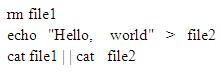
What is displayed when this sequence of commands is executed using the bash shell?
- Hello, world
- cat: cannot open file1: No such file or directory Hello, world
- cat: cannot open file1: No such file or directory
- bash: syntax error near unexpected token '| |'
- bash: syntax error broker pipe
Correct answer: B
Question 4
Which two are true about accounts, groups, and roles in the Solaris user database?
- All Solaris user accounts must have a unique UID number.
- A Solaris account name may be any alphanumeric string, and can have a maximum length of 8 characters.
- Account UID numbers 0-09 are system-reserved.
- The GID for an account determines the default group ownership of new files created by that account.
- The groups that an account is a member of are determined by the entries in the /etc/group file.
Correct answer: A, B
Explanation:
A: Solaris uses a UID (User ID) to identify each user account. The UID is a unique number assigned to each user. It is usually assigned by the operating system when the account is created.B: In Solaris the account name can include any alphanumeric string (and . _ -). The maximum length is 8 characters. A: Solaris uses a UID (User ID) to identify each user account. The UID is a unique number assigned to each user. It is usually assigned by the operating system when the account is created.
B: In Solaris the account name can include any alphanumeric string (and . _ -). The maximum length is 8 characters.
Question 5
User jack, whose account is configured to use the korn shell, logs in and examines the value of his PATH environment variable:
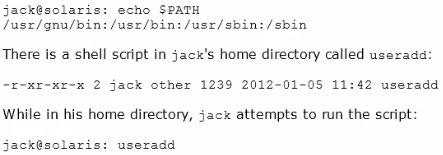
What will happen, and why?
- He will get a "file not found" error, because the current directory is not in his seaech path.
- He will get a "file not found" error, because his home directory is not in his search path.
- The useradd script will execute, because jack is in the same directory that the script is located in.
- The command /user/sbin/useradd will execute, because it is the last match in the search path.
- The command /user/sbin/useradd will execute, because it is the first match in the search path.
Correct answer: D
Question 6
Your server has a ZFS storage pool that is configured as follows:
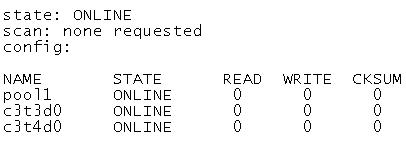
The server has two spate 140-GB disk drives: c3t5d0 c3t6d0
Which command would add redundancy to the pool1 storage pool?
- zpool attach pool1 c3t5d0 c3t6d0
- zpool attach pool1 c3t3d0 c3c5d0; zpoo1 attach pool1 c3t4d0 c3t6d0
- zpool mirror pool1 c3t5d0 c3t6d0
- zpool add pool1 mirror c3t5d0 c3t6d0
- zpool add raidz pool1 c3t5d0 c3t6d0
Correct answer: A
Explanation:
You can convert a non-redundant storage pool into a redundant storage pool by using the zpool attach command.Note: zpool attach [-f] pool device new_deviceAttaches new_device to an existing zpool device. The existing device cannot be part of a raidz configuration. If device is not currently part of a mirrored configuration, device automatically transforms into a two-way mirror of device and new_device. If device is part of a two-way mirror, attaching new_device creates a three-way mirror, and so on. In either case, new_device begins to resilver immediately. You can convert a non-redundant storage pool into a redundant storage pool by using the zpool attach command.
Note: zpool attach [-f] pool device new_device
Attaches new_device to an existing zpool device. The existing device cannot be part of a raidz configuration. If device is not currently part of a mirrored configuration, device automatically transforms into a two-way mirror of device and new_device. If device is part of a two-way mirror, attaching new_device creates a three-way mirror, and so on. In either case, new_device begins to resilver immediately.
Question 7
User jack logs in to host solaris and then attempts to log in to host oracle using ssh. He receives the following error message:
The authenticity of host oracle (192.168.1.22) can't be established. RSA key fingerprint is 3B:23:a5:6d:ad:a5:76:83:9c:c3:c4:55:a5:18:98:a6
Are you sure you want to continue connecting (yes/no)?
Which two are true?
- The public host key supplied by solaria is not known to the host oracle.
- The error would not occur if the RSA key fingerprint shown in the error message was added to the /etc/ssh/known_hosts file on solaris.
- The private host key supplied by oracle is not known to solaris.
- If jack answers yes, the RSA public key for the host oracle will be added to the known_hosts file for the user jack.
- The public host key supplied by oracle is not known to the host solaris.
Correct answer: B, D
Explanation:
The fingerprints are used to guard against man in the middle attacks. Since ssh logins usually work over the internet (an insecure connection), someone could hijack your connection. When you try to log into yourmachine.com, he could get "in the middle" and return your challenge as if he was yourmachine.com. That way, he could get hold of your login password.To make this attack harder, ssh stores the fingerprint of the server's public key on the first connection attempt. You will see a prompt like:The authenticity of host 'eisen (137.43.366.64)' can't be established.RSA key fingerprint is cf:55:30:31:7f:f0:c4:a0:9a:02:1d:1c:41:cf:63:cf.Are you sure you want to continue connecting (yes/no)When you enter yes, ssh will add the fingerprint to your known_hosts file. you will seeCode:Warning: Permanently added 'eisen, 137.43.366.64' (RSA) to the list of known hosts.The next time you login, ssh will check whether the host key has changed. A changing host key usually indicates a man in the middle attack, and ssh refuses to connect. The fingerprints are used to guard against man in the middle attacks. Since ssh logins usually work over the internet (an insecure connection), someone could hijack your connection. When you try to log into yourmachine.com, he could get "in the middle" and return your challenge as if he was yourmachine.com. That way, he could get hold of your login password.
To make this attack harder, ssh stores the fingerprint of the server's public key on the first connection attempt. You will see a prompt like:
The authenticity of host 'eisen (137.43.366.64)' can't be established.
RSA key fingerprint is cf:55:30:31:7f:f0:c4:a0:9a:02:1d:1c:41:cf:63:cf.
Are you sure you want to continue connecting (yes/no)
When you enter yes, ssh will add the fingerprint to your known_hosts file. you will see
Code:
Warning: Permanently added 'eisen, 137.43.366.64' (RSA) to the list of known hosts.
The next time you login, ssh will check whether the host key has changed. A changing host key usually indicates a man in the middle attack, and ssh refuses to connect.
Question 8
User jack logs in to host Solaris and executes the following command sequence:
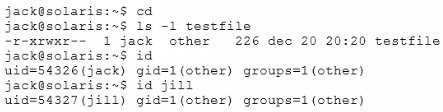
Which three statements are correct?
- User jack can edit testfile because he has read and write permissions at the group level.
- User jack can use cat to output the contents of testfile because he has read permission as the file owner.
- User jill can change the permissions of testfile because she has write permission for the file at the group level.
- User jill can edit testfile because she has read and write permission at the group level.
- User jack can change permissions for testfile because he is the owner of the file.
- User jack can change permissions for testfile because he has execute permission for the file.
Correct answer: D, E, F
Question 9
A user brian is configured to use the bash shell. His home directory is /export/home/brian, and contains a .profile and a .bashrc file.
In the -profile, there are these lines:
genius =ritchie
export genius
In the .bashrc us this line:
genius=kernighan
In /etc/profile are these lines:
genius=thompson
export genius
When brian logs in and asks for the value of genius, what will he find, and why?
- genius will be ritchie, because that was the value exported in .profile.
- genius will be kernighan, because .bashrc executes after .profile.
- genius will be ritchie because variable settings in .profile take precedence over variable settings in .bashrc.
- genius will be ritchie because .profile executes after .bashrc.
- genius will be thompson because /etc/profile system settings always override local settings.
Correct answer: C
Question 10
User brian changes the permissions for db_data this command:
chmod 4755 db_data
What is true?
- db_data now has permissions rwsr-xr-x and can be deleted only by user brian.
- db_data now has permissions rwsr-xr-x and, if executed, will inn with the permissions of user brian.
- db_data now has permissions rwxr-sr-x and can be deleted only by members of the group owning it.
- The permissions for db_data cannot be determined, because the permissions prior to the change have not been specified.
- db_data must be an ordinary file, because special permissions cannot be set on a directory.
Correct answer: C
Explanation:
Use the chmod command to change permissions for a file or directory. You must be the owner of a file or directory, or have root access, to change its permissions.Here we do not know if brian owns db_data.Note:Permission -7 full6 read and write5 read and execute4 read only3 write and execute2 write only1 execute only0 none0 --- no permission1 --x execute2 -w- write3 -wx write and execute4 r-- read5 r-x read and execute6 rw- read and write7 rwx read, write and executSolaris: Solaris Advanced User's Guide Use the chmod command to change permissions for a file or directory. You must be the owner of a file or directory, or have root access, to change its permissions.
Here we do not know if brian owns db_data.
Note:
Permission -
7 full
6 read and write
5 read and execute
4 read only
3 write and execute
2 write only
1 execute only
0 none
0 --- no permission
1 --x execute
2 -w- write
3 -wx write and execute
4 r-- read
5 r-x read and execute
6 rw- read and write
7 rwx read, write and execut
Solaris: Solaris Advanced User's Guide
Question 11
A user jack, using a bash shell, requests a directory listing as follows:

Which three statements are correct?
- The pattern dir? will expand to dira dirb dirc.
- The pattern dir*a will expand to diraa.
- The pattern dir*a will expand to dira diraa.
- The pattern dir*b? will expand to dirabc.
- The pattern dir*b? will expand to dirb dirabc.
Correct answer: A, C, D
Explanation:
A: dir followed by a single letter.C: dir followed by any characters ending with a.D: dir followed by any characters, then character b, then one single character. only dirabc matches A: dir followed by a single letter.
C: dir followed by any characters ending with a.
D: dir followed by any characters, then character b, then one single character. only dirabc matches
HOW TO OPEN VCE FILES
Use VCE Exam Simulator to open VCE files
HOW TO OPEN VCEX FILES
Use ProfExam Simulator to open VCEX files
ProfExam at a 20% markdown
You have the opportunity to purchase ProfExam at a 20% reduced price
Get Now!