Download Excel 2010.77-882.CertKiller.2020-01-15.10q.tqb
| Vendor: | Microsoft |
| Exam Code: | 77-882 |
| Exam Name: | Excel 2010 |
| Date: | Jan 15, 2020 |
| File Size: | 679 KB |
How to open TQB files?
Files with TQB (Taurus Question Bank) extension can be opened by Taurus Exam Studio.
Purchase
Coupon: TAURUSSIM_20OFF
Discount: 20%
Demo Questions
Question 1
Jack wants the rows containing the name Tom and product Jam. There are thousands of entries in the log. Plowing through all the records will be time taking. Which option can be used to view only the relevant records?
- All filter
- Sort
- Find
- Auto filter
Correct answer: D
Question 2
You are creating a business report by using Microsoft Excel 2010. You have arranged sales data as shown below:
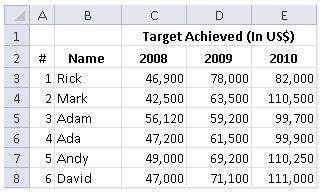
You want to provide pictorial representation of the trend of these sales data in front of each row. Which of the following steps will you choose to accomplish the task involving the least amount of administrative burden?
- Use charts.
- Use illustrations.
- Use conditional formatting.
- Use spark lines.
Correct answer: D
Question 3
You work as an Office Assistant for Media Perfect Inc. You are creating a report in Excel. You have selected all worksheets available in the workbook as shown below:
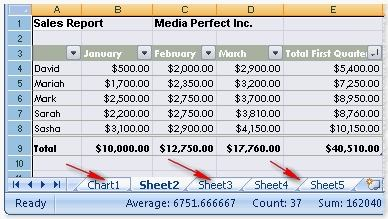
Now, you want to cancel the selection. Which of the following steps will you take to accomplish the task with least administrative effort?
- Double-click on one of the selected sheets.
- Click on one of the selected sheets.
- Click any unselected sheet.
- Click the Single Sheet options in the Sheet Options group on the Page Layout tab.
- Right-click the selected sheets. Click the Ungroup Sheets option from the shortcut menu.
Correct answer: E
Question 4
You work as an Office Assistant for Peach Tree Inc. Your responsibility includes creating sales incentive report of all sales managers for every quarter. You are using Microsoft Excel to create a worksheet for preparing the report. You have inserted the sales figures of all sales managers as shown in the image given below:
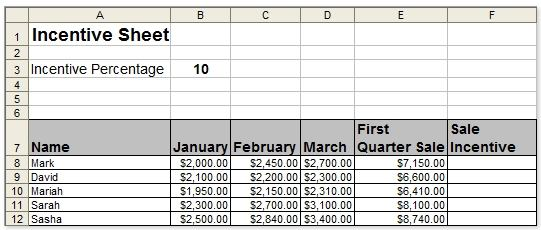
You have to calculate the first quarter incentives for all sales managers. The incentive percentage (provided in cell B3) is fixed for all sales managers. The incentive will be calculated on their total first quarter sales. You have to write a formula in the cell F8. Then you will drag the cell border to the cell F12 to copy the formula to all the cells from F8 to F12. In the first step, you select the F8 cell. Which of the following formulas will you insert to accomplish the task?
- =B3/100 * $E$8
- =$B$3/100 * E8
- =B3/100 * E8
- =B3/100 * &E&8
- =&B&3/100 * E8
Correct answer: B
Question 5
You work as an Office Assistant for Tech Perfect Inc. Your responsibility includes preparing sales reports of the company. You have created a sales report in a workbook of Excel 2010. Your workbook includes several worksheets as shown in the image given below:

You want the sheet tabs of the sheets containing charts to appear in red color. Which of the following steps will you take to accomplish the task?
- Select the sheets containing charts.Select the Effects option in the Themes group on the Page Layout page.
- Select the sheets containing charts.Select the Colors option in the Themes group on the Page Layout page.
- Select the sheets containing charts.Right-click on the sheet tabs.Choose the Tab Color option from the shortcut menu.
- Select the sheets containing charts.Right-click on the sheet tabs.Choose the Sheet Color option from the shortcut menu.
Correct answer: C
Question 6
Alan works as a Sales Manager for MVP Technologies. He is creating a sales report in Microsoft Excel 2010. In the report, he needs to enter the names of sales executives in one column and the sales target (in dollars) achieved by them in the next column as shown in the image below:
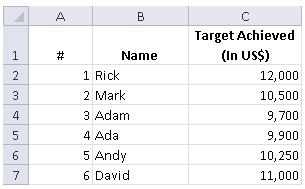
He wants to ensure that the color of a cell changes automatically to orange when the sales figure entered in the cell is more than $10,000. Which of the following actions will he take to accomplish the task?
- Use the Auto Correct feature.
- Use a style.
- Use the Auto Format feature.
- Use the conditional formatting feature.
Correct answer: D
Question 7
You work as a Sales Manager for Peach Tree Inc. Your responsibility includes creating sales reports of the company. You create a report in a workbook in Excel 2010. The report contains a worksheet that has been formatted by using the conditional formatting feature. You have specified five conditions for conditional formatting of a list appearing in the sheet. You save the report and send it to your manager. He informs you that the sheet on which conditional formatting feature is applied is not appearing according to his requirement. He further specifies that only a few of the conditions are applying. What is the most likely cause?
- You have not saved the Excel workbook in .xlsm format.
- Specified rules are conflicting.
- Some of the conditions are cross referencing in the specified conditional format conditions.
- The manager is using Excel 2003 or earlier version of Excel.
Correct answer: D
Question 8
You work as an Office Assistant for Tech Perfect Inc. You are creating a report in a workbook in Excel 2010. Before creating a final report, you are required to test some logical conditions. You enter test data in a worksheet in the report. The fragment of the sheet is shown below:
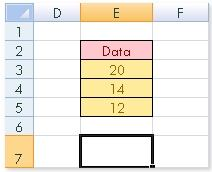
You are testing logical conditions to use them in your report later. Which of the following
conditional formulas will return "True"?
- =OR(E3>E4, E3<E5)
- =AND(E3<E4, E3>E5)
- =AND(E3>E4, E3<E5)
- =NOT(E3+E4=34)
Correct answer: A
Question 9
You work as a Sales Manager for Maini Industries. Your company manufactures and sells construction equipment. You have to create a report that will show the highest selling items of each month. The report will be in the following format:
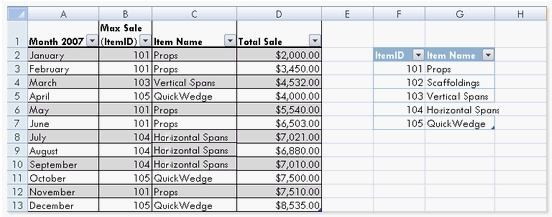
In a workbook, you create a table named Item_table as shown below:
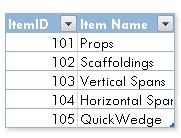
You fill in the required entries in the workbook.
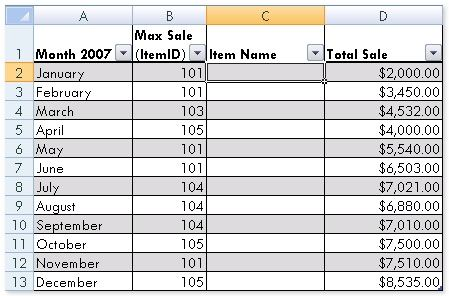
For the third column of the sheet, you want to use formulas to fill in the values. You want the cells in the third column to get automatically filled with the names corresponding to ItemID in the second column. You want the exact values to be filled in the column. You select the C2 cell in the third column. Which of the following formulas will you enter in order to accomplish the task?
- =VLOOKUP(B2,Item_table,2,TRUE)
- =VLOOKUP(B2,Item_table,2,FALSE)
- =VLOOKUP(2,Item_table,B2,FALSE)
- =VLOOKUP(2,Item_table,B2,TRUE)
Correct answer: B
Question 10
You work as an Office Assistant for Tech Tree Inc. You have created a report in a workbook in Microsoft Excel 2010. You have included various subtotals in a worksheet in the report to verify data accuracy. You want to remove all subtotals from the sheet before you send it to your manager. Which of the following steps will you take to accomplish the task with the least administrative effort?
- Hide the rows containing subtotals.
- Select all the subtotals. From the shortcut menu, click the Remove All Subtotals option.
- Open the Subtotal dialog box by clicking the Subtotal option in the Outline group on the Data tab. Click the Remove All button.
- Delete all the rows containing subtotals.
Correct answer: C
HOW TO OPEN VCE FILES
Use VCE Exam Simulator to open VCE files
HOW TO OPEN VCEX FILES
Use ProfExam Simulator to open VCEX files

ProfExam at a 20% markdown
You have the opportunity to purchase ProfExam at a 20% reduced price
Get Now!